Audiophile is a person who loves sound characteristic and can compare sound in detail, also has taste of sound characteristic.
Firstly, being an audiophile is not about swag! Products like Beats by Dr. Dre, Skullcandy are just swagger brands. The sound you get from swagger brands are just bassy, boomy, even just equals to under $50 headphones. Even those artists, actors, famous people used it (in the advertisement photos), remember they're just paid to use it. Don't get easily believe the hype!
Before buying an audio setup or an audio stuff, choose audio shop where you can try them freely. So you can decide which audio setup meets your taste of sound the most. The more you listen/try some setups, the more you can compare sounds. You will know what is soundstage, decay, timbre, and many other kind of sounds. But being too technical isn't good, because the keynote of listening music is to enjoy it.
Happy listening~! Find your taste!
Senin, 11 November 2013

Choosing DAP (Digital Audio Player, portable)
Firstly, if you ask someone to recommend, you will be asked how much budget? If it's about $200 or 2,200,000 Rupiah you can choose between an iPod 4th gen or Fiio X3. I choose them as example.
What will you get if you choose:
iPod 4th gen:
- Availability of bypassing internal amp or bypassing the DAC too (then using external DAC/amp)
- Camera, games, wifi, bluetooth connection which are common entertainments and tasks
- Better screen
Fiio X3:
- More significantly better sound quality than iPod 4th gen for it's built-in/internal amp and DAC
- Supports more lossless audio formats
- Can't use external DAC/amplifier
On this limited 2,200,000 Rupiah budget, an audiophile would choose the Fiio X3. But if you have plans of adding external DAC and amp (or a DAC integrated with Amp), iPod can be an option. So, it's about decision. Use money wisely~!
What will you get if you choose:
iPod 4th gen:
- Availability of bypassing internal amp or bypassing the DAC too (then using external DAC/amp)
- Camera, games, wifi, bluetooth connection which are common entertainments and tasks
- Better screen
Fiio X3:
- More significantly better sound quality than iPod 4th gen for it's built-in/internal amp and DAC
- Supports more lossless audio formats
- Can't use external DAC/amplifier
On this limited 2,200,000 Rupiah budget, an audiophile would choose the Fiio X3. But if you have plans of adding external DAC and amp (or a DAC integrated with Amp), iPod can be an option. So, it's about decision. Use money wisely~!
How about external DAC?
From computers, Android, even iPod you can use external DAC. Soundcard which usually have PCI express 2.0 interface is also a DAC too.
For computer, it's just a DAC connected with USB cable. For Android, use USB OTG cable, then connect the OTG cable with USB cable to the DAC. iPod usually have a 30-pin connector to male USB cable to connect to a DAC. But not all DAC have USB port. Some DAC only have optical and coaxial input, so a USB to coax/optical converter is made. The reason why using optical/coax is to remove jitters. As on the picture below, jitter is a point of frequency where it peaks. Of course peak at high frequency is disturbing. Jitter is caused by the powerline of USB. That's why audio grade USB cables are made, also stuffs like USB isolator.

Line out Dock (LOD), a way to improve sound quality
("Amp" is the short name of Amplifier)
Have you seen any iPod/iPhone connected to a stuff looks like box under the iPod with a short cable? It's called LOD! (Line Out Dock). The function of LOD cable is to bypass the internal amp and use an external amp.
Have you seen any iPod/iPhone connected to a stuff looks like box under the iPod with a short cable? It's called LOD! (Line Out Dock). The function of LOD cable is to bypass the internal amp and use an external amp.

So, a LOD cable which is also categorized as analog cables affect sound quality and character. A LOD cable starts from 100,000 Rupiah to 2,500,000 Rupiah related to the cable material, jacks, and the ports. It's not worth to use a cheap LOD cable to an expensive external amp, and vice versa.
 |
| Jena LOD cable with Oyaide Silver jack for iPod/iPhone 30-pin |
What's difference about digital and analog signal?
For easy explanation, I use a parable example:
You got a document you need to copy to you friends. It's hand written. But at first you don't know that other class will want the document too. How will you distribute it?
Analog:
You photocopied the hand-written document and distribute it to your classmates. Then the next day other class asked your classmate to get copies of the document too, so your classmate photocopied his copy. The result is the original compared to the first and second copy are all different. The copy the other class get is blurred compared to the original.
Digital:
You typed the hand-written document and save it as .doc document. Then you emailed it to your classmates. When the other class asked you classmate for copy, he emailed the .doc document to that other class. No copy is different than the original document you typed right?
So, a headphone cable which transfers analog signal also affects the sound quality of the headphone. When it comes to analog, cable does matters. AFAIK the most expensive cable is Piccolino, 1 meter for an IEM (In ear monitoring, kind of earphone) costs about $1000, but gives the sound quality equals it's price.
Digital signals doesn't as matters as analog signal. Only experienced audiophiles can hear the difference between digital cables (such USB, coaxial, optical which connects transport to external DAC). Still, the most expensive digital cable doesn't beat the price of most expensive analog cable.
I recommend USB cable with ferrite cores for connecting a PC to an external DAC.
You got a document you need to copy to you friends. It's hand written. But at first you don't know that other class will want the document too. How will you distribute it?
Analog:
You photocopied the hand-written document and distribute it to your classmates. Then the next day other class asked your classmate to get copies of the document too, so your classmate photocopied his copy. The result is the original compared to the first and second copy are all different. The copy the other class get is blurred compared to the original.
Digital:
You typed the hand-written document and save it as .doc document. Then you emailed it to your classmates. When the other class asked you classmate for copy, he emailed the .doc document to that other class. No copy is different than the original document you typed right?
So, a headphone cable which transfers analog signal also affects the sound quality of the headphone. When it comes to analog, cable does matters. AFAIK the most expensive cable is Piccolino, 1 meter for an IEM (In ear monitoring, kind of earphone) costs about $1000, but gives the sound quality equals it's price.
 |
| Piccolino cable for JH IEM |
Digital signals doesn't as matters as analog signal. Only experienced audiophiles can hear the difference between digital cables (such USB, coaxial, optical which connects transport to external DAC). Still, the most expensive digital cable doesn't beat the price of most expensive analog cable.
I recommend USB cable with ferrite cores for connecting a PC to an external DAC.
How digital audio works?
Firstly, a song file like MP3, WAV, FLAC, etc. is the main source of sound quality. Those formats are still in digital form. They're categorized into 2, Lossless and Lossy. Lossless means pure sound quality or near the original record of a song/music. Example of lossless formats are WAV, FLAC, AIFF, APE, TTA, etc. Lossy means the recording isn't as same as original recording. Not edited but means not as good as the original. Then lossy formats are MP3, AAC, ALAC, etc. For analogy, lossless and lossy is like between healthy cow and unhealty cow.
The place where the song file remains is called Transport. From Transport, the song file is converted from digital to analog via DAC (Digital to Analog Converter). Human only understands analog, of course we can't feel or receive a digital thing literally. The DAC is the second part which affects sound quality. In this section, DAC is like the processing of the meat, whether a good processing or not.
Of course something raw usually tastes plain, so after the sound is converted to analog, the analog signal comes to Amplifier. Amplifier gives the characteristic of sound. Just like a chef, it's about how the chef cook it. Then from an amplifier, the signal comes to speaker or headphone which we use to hear. The headphone/speaker has characteristic too, it's how the sound is represented. Just like how the food is served. There's no way of serving a steak chopped. Of course serving something can be detailed or not.
Nowadays people can listen music from computer, phones, and many more. Those stuffs of course have built in DAC and Amplifier. Also the transport is the problem of supporting song file formats. Having a 30$ MP3 player doesn't support lossless formats. A 100$ digital audio player would have supported lossless formats.
The place where the song file remains is called Transport. From Transport, the song file is converted from digital to analog via DAC (Digital to Analog Converter). Human only understands analog, of course we can't feel or receive a digital thing literally. The DAC is the second part which affects sound quality. In this section, DAC is like the processing of the meat, whether a good processing or not.
Of course something raw usually tastes plain, so after the sound is converted to analog, the analog signal comes to Amplifier. Amplifier gives the characteristic of sound. Just like a chef, it's about how the chef cook it. Then from an amplifier, the signal comes to speaker or headphone which we use to hear. The headphone/speaker has characteristic too, it's how the sound is represented. Just like how the food is served. There's no way of serving a steak chopped. Of course serving something can be detailed or not.
Nowadays people can listen music from computer, phones, and many more. Those stuffs of course have built in DAC and Amplifier. Also the transport is the problem of supporting song file formats. Having a 30$ MP3 player doesn't support lossless formats. A 100$ digital audio player would have supported lossless formats.
Hivi Swans M200 MK-II

Trying this pair of speakers in A-42 ground floor Hi Tech Mall, I can say this one a good choice. Especially for vocals, the crossfade represents the vocal nicely on middle. It was like someone really singing in front of me. When I was listening Hey Jude – Yao Si Ting (all effect knob zero), the mid frequencies presents forward. I tried increasing the treble knob and the sound gets brighter with no sibilance happened. But it lacks of sub bass, also because it’s a 2.0ch bookshelf speaker when I tested it with Hotel California – Hell freezes over 1994. Guitar and claps represents good, but the pedal drum can’t be helped, just little decay on the pedal. I didn’t know what cable and DAC/Amp were used when I tested it. But this speaker is worth for vocal lovers. Sorry if this review has bias, I didn’t use speaker stand in testing this M200 MK-II.
Final Audio Design Heaven II - short review


Which mechanical keyboard is for me?
(More to the conclusions)
If you’re a gamer, I would recommend the red switch. For typing, blue switch is the most favorite but also the noisiest switch in Cherry MX variants. Brown can be a hybrid option between gaming and typing despite it’s tactile, but red is still the most silent compared to other Cherry MX. Want the most silent and comfortable feel for typing? Then you can choose electro-static keyboard (such Topre switches) but far more expensive than mechanical Cherry MX switches. Older keyboards like IBM model M with buckling spring (mechanical categorized) switches are cheaper and as comfortable as topre but it’s the noisiest of all keyboards, even noisier than Cherry MX blue switch. May price under $100, but they’ve become extinct that they are over 30 years. Also buckling spring keyboard weight about 4-5 kilograms.
Topre:
Most comfortable to type. But only have few aftermarket keycaps, difficulties of install/uninstall keycaps
Cherry MX:
Most common mechanical switch, customizable keycaps. More noise compared to other switches (compared to rubber dome, scissors-switch, chiclet, etc.).
Buckling spring:
One of the most comfortable to type, but extinct, noisiest. A legendary.
If you’re a gamer, I would recommend the red switch. For typing, blue switch is the most favorite but also the noisiest switch in Cherry MX variants. Brown can be a hybrid option between gaming and typing despite it’s tactile, but red is still the most silent compared to other Cherry MX. Want the most silent and comfortable feel for typing? Then you can choose electro-static keyboard (such Topre switches) but far more expensive than mechanical Cherry MX switches. Older keyboards like IBM model M with buckling spring (mechanical categorized) switches are cheaper and as comfortable as topre but it’s the noisiest of all keyboards, even noisier than Cherry MX blue switch. May price under $100, but they’ve become extinct that they are over 30 years. Also buckling spring keyboard weight about 4-5 kilograms.
Topre:
Most comfortable to type. But only have few aftermarket keycaps, difficulties of install/uninstall keycaps
Cherry MX:
Most common mechanical switch, customizable keycaps. More noise compared to other switches (compared to rubber dome, scissors-switch, chiclet, etc.).
Buckling spring:
One of the most comfortable to type, but extinct, noisiest. A legendary.
Does the build affects too?

Yes! Of course! The build means the solidity feel of typing/using the keyboard. Usually a not solid keyboards makes higher resonance when being used. Choose one with plate mounted switches (means the Cherry MX switches ya) which the plate absorbs the resonance for typing. The build isn’t just about the plate, but also the body of the keyboard from material, coating, and hardness. It’s like between knocking a steel plated door and wood door. Smashing them on same power would results the steel plated door resonances longer than the wood door. Build doesn’t really matter if you rarely bottom out when typing, but at least I recommend buying a plate mounted one. The plate also defends the board behind it where the switches are soldered.
Keycaps? Does it affect my performance?
Yes! Especially if you're sensitive with it! Mostly stock keycaps of mechanical keyboards nowadays are made of ABS.
ABS plastic is light, easy to produce, also easy to customize, that's why they goes mainstream in keycap markets. For less resonance and heavier keycap that makes lighter on typing, use PBT plastic material keycaps which is harder to produce despite it's hard material. PBT keycaps are also thicker than ABS. The lightest to type (so it's the heavier material) is metal keycaps, but they're really expensive that a set of 37 metal keycaps can afford a new mechanical keyboard!

(those 37 blue keycaps are from PBT material, the others black rubber coated are ABS)
 (metal keycaps)
Now the vice versa, the lighter to type means the slower the keyboard key rebounds (the force/speed of the keyboard key/switch from pressed to unpressed). Especially for some games which need fast rebound. But more force means harder to press too, makes the fingers tired too fast (especially typing). If it's about typing, the feel is more important than minimizing the latency of rebound. Of course because there's no way a person would type on a same key.
ABS plastic is light, easy to produce, also easy to customize, that's why they goes mainstream in keycap markets. For less resonance and heavier keycap that makes lighter on typing, use PBT plastic material keycaps which is harder to produce despite it's hard material. PBT keycaps are also thicker than ABS. The lightest to type (so it's the heavier material) is metal keycaps, but they're really expensive that a set of 37 metal keycaps can afford a new mechanical keyboard!

(those 37 blue keycaps are from PBT material, the others black rubber coated are ABS)
 (metal keycaps)
Now the vice versa, the lighter to type means the slower the keyboard key rebounds (the force/speed of the keyboard key/switch from pressed to unpressed). Especially for some games which need fast rebound. But more force means harder to press too, makes the fingers tired too fast (especially typing). If it's about typing, the feel is more important than minimizing the latency of rebound. Of course because there's no way a person would type on a same key.
Cherry MX switches
Linear switches
Linear switches have the simplest operation, moving straight up and down without any additional tactile feedback or loud clicking noise – we’ll come to these more complicated switches later on. There are two common types of linear switches – Black and Red.

Cherry MX Black switches were introduced in 1984, making them one of the older Cherry switches. They have a medium to high actuation force, at 60 cN (gr), which means they are the stiffest of the four most common Cherry switches. The stronger spring also means that they rebound faster, meaning they can be actuated quite quickly given enough force – although you may also find fatigue becomes more of a factor than with other switches. May suitable for needs of double click with it's fast rebound.

Cherry MX Red switches are the most silent of all Cherry MX switches (because it's linear). They have a low actuation force, at 45 cN (gr) – tied with Brown for the lowest of the four most common switches. Red switches have been marketed as a gaming switch, with the light weighting allowing for more rapid actuation, and have become increasingly common in gaming keyboards.
Tactile, non-clicky switches
Tactile switches provide, as the name suggests, additional tactile feedback as the key actuates. As you press the key down, there is a noticeable bump which lets you know that your key press has been registered.

The most popular type of tactile, non-clicky switch is the Cherry MX Brown. This switch was introduced in 1994 as a special ‘ergo soft’ switch, but quickly became one of the most popular switches. It has 45 cN (gr) actuation force. Brown switches are good middle-of-the-road option appropriate for both typing and gaming. They are also ideal for typing in office environments, where a clicky switch might annoy some.
Tactile, clicky switches

The Cherry MX Blue is the most common clicky switch, and was first made available in Filco keyboards in 2007. Blue switches are favoured by typists due to their tactile bump and audible click, but can be less suitable for gaming as the weighting is relatively high – 50 cN – and it is a bit harder to double tap, as the release point is above the actuation point. Blue switches are noticeably louder than other mechanical switches, which are already louder than rubber domes, so these switches can be a bit disruptive in close working conditions.
Linear switches have the simplest operation, moving straight up and down without any additional tactile feedback or loud clicking noise – we’ll come to these more complicated switches later on. There are two common types of linear switches – Black and Red.
Cherry MX Black switches were introduced in 1984, making them one of the older Cherry switches. They have a medium to high actuation force, at 60 cN (gr), which means they are the stiffest of the four most common Cherry switches. The stronger spring also means that they rebound faster, meaning they can be actuated quite quickly given enough force – although you may also find fatigue becomes more of a factor than with other switches. May suitable for needs of double click with it's fast rebound.
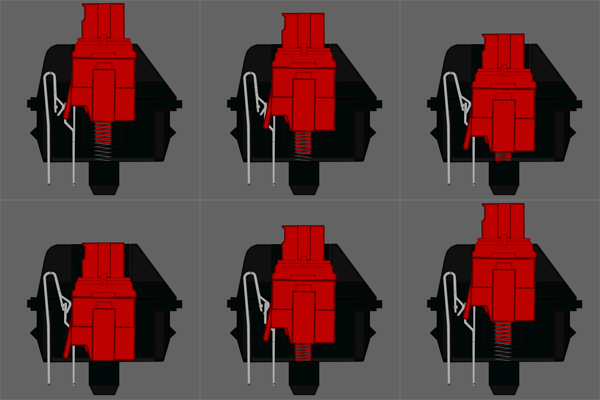
Cherry MX Red switches are the most silent of all Cherry MX switches (because it's linear). They have a low actuation force, at 45 cN (gr) – tied with Brown for the lowest of the four most common switches. Red switches have been marketed as a gaming switch, with the light weighting allowing for more rapid actuation, and have become increasingly common in gaming keyboards.
Tactile, non-clicky switches
Tactile switches provide, as the name suggests, additional tactile feedback as the key actuates. As you press the key down, there is a noticeable bump which lets you know that your key press has been registered.
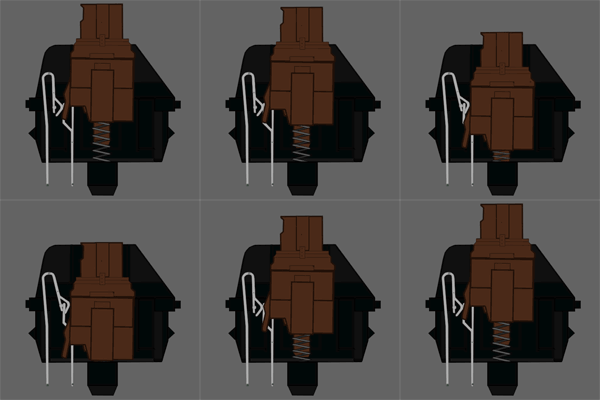
The most popular type of tactile, non-clicky switch is the Cherry MX Brown. This switch was introduced in 1994 as a special ‘ergo soft’ switch, but quickly became one of the most popular switches. It has 45 cN (gr) actuation force. Brown switches are good middle-of-the-road option appropriate for both typing and gaming. They are also ideal for typing in office environments, where a clicky switch might annoy some.
Tactile, clicky switches
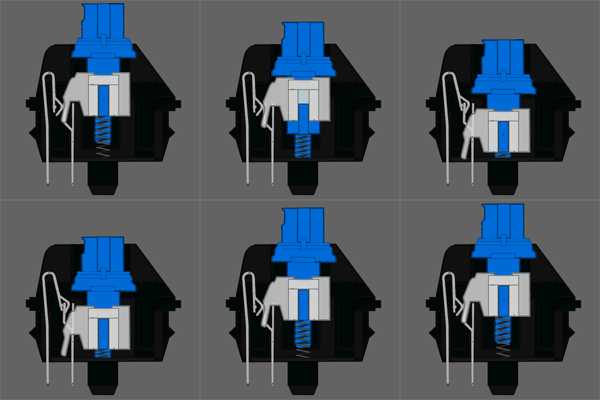
The Cherry MX Blue is the most common clicky switch, and was first made available in Filco keyboards in 2007. Blue switches are favoured by typists due to their tactile bump and audible click, but can be less suitable for gaming as the weighting is relatively high – 50 cN – and it is a bit harder to double tap, as the release point is above the actuation point. Blue switches are noticeably louder than other mechanical switches, which are already louder than rubber domes, so these switches can be a bit disruptive in close working conditions.
Mechanical Keyboards?

Why
is it so expensive? Because it has lighter keystrokes than nowadays
rubber dome keyboards and has lifespan of 50 million keystrokes. Rubber
dome keyboards which has been common are known to have lifespan only 10
million keystrokes. Scissors switches on thin keyboards have 20 million
keystrokes lifespan. Talking about the stroke needed to press each
button on the keyboard, mechanical keyboards are most comfortable and
the lightest to press. As a budget comparison, rubber dome keyboards
price on average of 200,000 IDR, and mechanical starts from 1,000,000
IDR. The lifespan 5 times than the rubber dome's, but with advantage of
lighter keystroke and no ghosting for gamers (Full NKRO). And also
mechanical keyboards can be customized on their keycaps. Different
material of keycap has different typing feel too. About switches and
keycaps will be explained on next post.
[credits to Admiral Wiem for the photo]
Google Reader?

Google Reader was an RSS/Atom feed aggregator operated by Google. It was created by Chris Wetherell and launched on October 7, 2005. It's used for reading news, by subscribing some feeds or searching. Just like subscribing newspaper, but it's free, you can subscribe any feed you want. But now Google Reader has been closed since 1st July 2013.
This was the interface of Google Reader

What is Technorati?
Technorati is a real-time search
engine dedicated to the blogosphere. It only searches through blogs to find
exactly what you’re looking for. At the time of this writing, Technorati was
tracking over 22 million sites and over a billion links, a mind-boggling amount.
How Do You Search for Blogs on Technorati?
Searching
for blogs on Technorati is thankfully a very easy task. Navigate to the Technorati home page, and type in
what you’re looking for into the main search query bar. If you’d like more
advanced search options, click on the “Options” text link right next to the
search query bar; a window will appear that will give you more search
parameters.
Technorati Blog Search Features
You
can also browse through Technorati
tags,
which are basically subjects or topics that bloggers have given to what they
are writing about. At the time of this writing, Technorati was tracking over
four million tags. The most popular 250 tags are shown on the Technorati Tag page; they are organized
in alphabetical order. The bigger the tag text is in the Technorati tag cloud,
the more popular or active that particular tag is.
Technorati
also has what it calls the Technorati
Blog Finder
which basically ends up to being Technorati’s directory of blogs, organized by
topic. You can browse through the categories, or scroll down to the bottom of
the page to view the most recently added blogs.
Technorati
has a Popular list of what’s getting the
most buzz on the Web; it’s interesting to come and see what people are
searching for here. News, books, movies, and blogs are the main categories in
What’s Popular. In addition, if you’d like to view the most popular blogs in
the blogosphere, you can check out the Top 100 Popular Blogs – “The biggest blogs in
the blogosphere, as measured by unique links in the last six months.”
Add Your Blog to Technorati
If
you would like to be added to Technorati’s list of blogs, Technorati offers
what they call Claim Your Blog; you give Technorati some basic information
and then you are offered a few different ways to have Technorati “claim” your
blog. Once this happens, you are in Technorati’s searchable blog database.
Obviously, the big advantage of this is you have more people looking at your
blog. However, my opinion is that this is not absolutely necessary – for
example, my personal blogs were all in there without me doing one thing.
Personalize Technorati with Watchlists and
Profiles
You
can personalize your Technorati experience with Watchlists; you can add a keyword or key phrase or URL
and Technorati will keep track of that topic for you. You can search within
your Watchlist, a handy feature, or you can view your Watchlist in Mini-view; a
pop-up window that you can have up while surfing the Web.
Why Should I Use Technorati?
I
use Technorati on a daily basis to track various trends and topics on the Web.
It’s an easy service to use, returns relatively good results, and offers a lot
of good insights into what the Web at large is talking about. The only beef I
would have with Technorati is that a lot of the results returned can be spammy
at times; they need to clean this up so all the results are quality. However,
overall, I would highly recommend Technorati as a great way to search the
blogosphere.
Langganan:
Komentar (Atom)