
Senin, 11 November 2013
Final Audio Design Heaven II - short review


Which mechanical keyboard is for me?
(More to the conclusions)
If you’re a gamer, I would recommend the red switch. For typing, blue switch is the most favorite but also the noisiest switch in Cherry MX variants. Brown can be a hybrid option between gaming and typing despite it’s tactile, but red is still the most silent compared to other Cherry MX. Want the most silent and comfortable feel for typing? Then you can choose electro-static keyboard (such Topre switches) but far more expensive than mechanical Cherry MX switches. Older keyboards like IBM model M with buckling spring (mechanical categorized) switches are cheaper and as comfortable as topre but it’s the noisiest of all keyboards, even noisier than Cherry MX blue switch. May price under $100, but they’ve become extinct that they are over 30 years. Also buckling spring keyboard weight about 4-5 kilograms.
Topre:
Most comfortable to type. But only have few aftermarket keycaps, difficulties of install/uninstall keycaps
Cherry MX:
Most common mechanical switch, customizable keycaps. More noise compared to other switches (compared to rubber dome, scissors-switch, chiclet, etc.).
Buckling spring:
One of the most comfortable to type, but extinct, noisiest. A legendary.
If you’re a gamer, I would recommend the red switch. For typing, blue switch is the most favorite but also the noisiest switch in Cherry MX variants. Brown can be a hybrid option between gaming and typing despite it’s tactile, but red is still the most silent compared to other Cherry MX. Want the most silent and comfortable feel for typing? Then you can choose electro-static keyboard (such Topre switches) but far more expensive than mechanical Cherry MX switches. Older keyboards like IBM model M with buckling spring (mechanical categorized) switches are cheaper and as comfortable as topre but it’s the noisiest of all keyboards, even noisier than Cherry MX blue switch. May price under $100, but they’ve become extinct that they are over 30 years. Also buckling spring keyboard weight about 4-5 kilograms.
Topre:
Most comfortable to type. But only have few aftermarket keycaps, difficulties of install/uninstall keycaps
Cherry MX:
Most common mechanical switch, customizable keycaps. More noise compared to other switches (compared to rubber dome, scissors-switch, chiclet, etc.).
Buckling spring:
One of the most comfortable to type, but extinct, noisiest. A legendary.
Does the build affects too?

Yes! Of course! The build means the solidity feel of typing/using the keyboard. Usually a not solid keyboards makes higher resonance when being used. Choose one with plate mounted switches (means the Cherry MX switches ya) which the plate absorbs the resonance for typing. The build isn’t just about the plate, but also the body of the keyboard from material, coating, and hardness. It’s like between knocking a steel plated door and wood door. Smashing them on same power would results the steel plated door resonances longer than the wood door. Build doesn’t really matter if you rarely bottom out when typing, but at least I recommend buying a plate mounted one. The plate also defends the board behind it where the switches are soldered.
Keycaps? Does it affect my performance?
Yes! Especially if you're sensitive with it! Mostly stock keycaps of mechanical keyboards nowadays are made of ABS.
ABS plastic is light, easy to produce, also easy to customize, that's why they goes mainstream in keycap markets. For less resonance and heavier keycap that makes lighter on typing, use PBT plastic material keycaps which is harder to produce despite it's hard material. PBT keycaps are also thicker than ABS. The lightest to type (so it's the heavier material) is metal keycaps, but they're really expensive that a set of 37 metal keycaps can afford a new mechanical keyboard!

(those 37 blue keycaps are from PBT material, the others black rubber coated are ABS)
 (metal keycaps)
Now the vice versa, the lighter to type means the slower the keyboard key rebounds (the force/speed of the keyboard key/switch from pressed to unpressed). Especially for some games which need fast rebound. But more force means harder to press too, makes the fingers tired too fast (especially typing). If it's about typing, the feel is more important than minimizing the latency of rebound. Of course because there's no way a person would type on a same key.
ABS plastic is light, easy to produce, also easy to customize, that's why they goes mainstream in keycap markets. For less resonance and heavier keycap that makes lighter on typing, use PBT plastic material keycaps which is harder to produce despite it's hard material. PBT keycaps are also thicker than ABS. The lightest to type (so it's the heavier material) is metal keycaps, but they're really expensive that a set of 37 metal keycaps can afford a new mechanical keyboard!

(those 37 blue keycaps are from PBT material, the others black rubber coated are ABS)
 (metal keycaps)
Now the vice versa, the lighter to type means the slower the keyboard key rebounds (the force/speed of the keyboard key/switch from pressed to unpressed). Especially for some games which need fast rebound. But more force means harder to press too, makes the fingers tired too fast (especially typing). If it's about typing, the feel is more important than minimizing the latency of rebound. Of course because there's no way a person would type on a same key.
Cherry MX switches
Linear switches
Linear switches have the simplest operation, moving straight up and down without any additional tactile feedback or loud clicking noise – we’ll come to these more complicated switches later on. There are two common types of linear switches – Black and Red.

Cherry MX Black switches were introduced in 1984, making them one of the older Cherry switches. They have a medium to high actuation force, at 60 cN (gr), which means they are the stiffest of the four most common Cherry switches. The stronger spring also means that they rebound faster, meaning they can be actuated quite quickly given enough force – although you may also find fatigue becomes more of a factor than with other switches. May suitable for needs of double click with it's fast rebound.

Cherry MX Red switches are the most silent of all Cherry MX switches (because it's linear). They have a low actuation force, at 45 cN (gr) – tied with Brown for the lowest of the four most common switches. Red switches have been marketed as a gaming switch, with the light weighting allowing for more rapid actuation, and have become increasingly common in gaming keyboards.
Tactile, non-clicky switches
Tactile switches provide, as the name suggests, additional tactile feedback as the key actuates. As you press the key down, there is a noticeable bump which lets you know that your key press has been registered.

The most popular type of tactile, non-clicky switch is the Cherry MX Brown. This switch was introduced in 1994 as a special ‘ergo soft’ switch, but quickly became one of the most popular switches. It has 45 cN (gr) actuation force. Brown switches are good middle-of-the-road option appropriate for both typing and gaming. They are also ideal for typing in office environments, where a clicky switch might annoy some.
Tactile, clicky switches

The Cherry MX Blue is the most common clicky switch, and was first made available in Filco keyboards in 2007. Blue switches are favoured by typists due to their tactile bump and audible click, but can be less suitable for gaming as the weighting is relatively high – 50 cN – and it is a bit harder to double tap, as the release point is above the actuation point. Blue switches are noticeably louder than other mechanical switches, which are already louder than rubber domes, so these switches can be a bit disruptive in close working conditions.
Linear switches have the simplest operation, moving straight up and down without any additional tactile feedback or loud clicking noise – we’ll come to these more complicated switches later on. There are two common types of linear switches – Black and Red.
Cherry MX Black switches were introduced in 1984, making them one of the older Cherry switches. They have a medium to high actuation force, at 60 cN (gr), which means they are the stiffest of the four most common Cherry switches. The stronger spring also means that they rebound faster, meaning they can be actuated quite quickly given enough force – although you may also find fatigue becomes more of a factor than with other switches. May suitable for needs of double click with it's fast rebound.
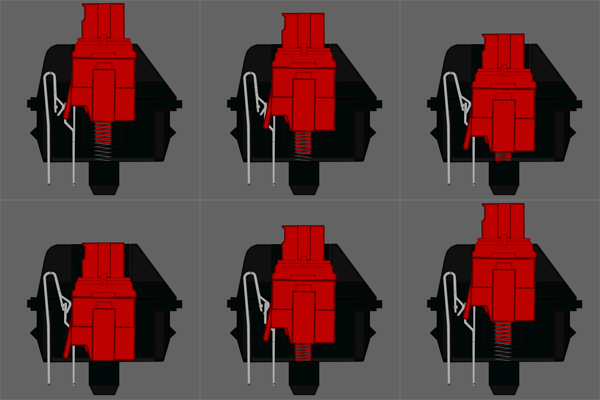
Cherry MX Red switches are the most silent of all Cherry MX switches (because it's linear). They have a low actuation force, at 45 cN (gr) – tied with Brown for the lowest of the four most common switches. Red switches have been marketed as a gaming switch, with the light weighting allowing for more rapid actuation, and have become increasingly common in gaming keyboards.
Tactile, non-clicky switches
Tactile switches provide, as the name suggests, additional tactile feedback as the key actuates. As you press the key down, there is a noticeable bump which lets you know that your key press has been registered.
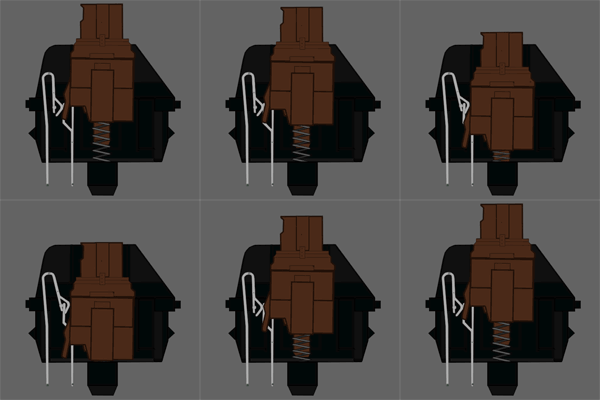
The most popular type of tactile, non-clicky switch is the Cherry MX Brown. This switch was introduced in 1994 as a special ‘ergo soft’ switch, but quickly became one of the most popular switches. It has 45 cN (gr) actuation force. Brown switches are good middle-of-the-road option appropriate for both typing and gaming. They are also ideal for typing in office environments, where a clicky switch might annoy some.
Tactile, clicky switches
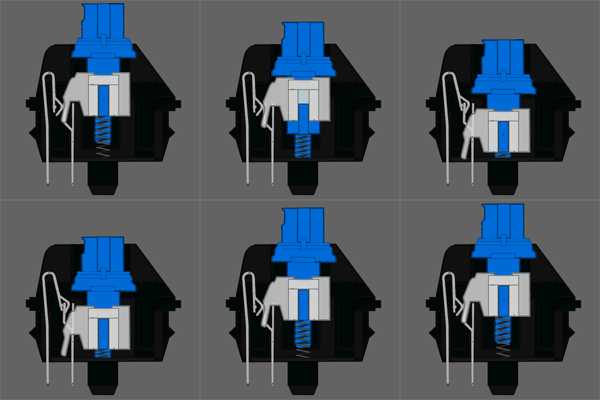
The Cherry MX Blue is the most common clicky switch, and was first made available in Filco keyboards in 2007. Blue switches are favoured by typists due to their tactile bump and audible click, but can be less suitable for gaming as the weighting is relatively high – 50 cN – and it is a bit harder to double tap, as the release point is above the actuation point. Blue switches are noticeably louder than other mechanical switches, which are already louder than rubber domes, so these switches can be a bit disruptive in close working conditions.
Mechanical Keyboards?

Why
is it so expensive? Because it has lighter keystrokes than nowadays
rubber dome keyboards and has lifespan of 50 million keystrokes. Rubber
dome keyboards which has been common are known to have lifespan only 10
million keystrokes. Scissors switches on thin keyboards have 20 million
keystrokes lifespan. Talking about the stroke needed to press each
button on the keyboard, mechanical keyboards are most comfortable and
the lightest to press. As a budget comparison, rubber dome keyboards
price on average of 200,000 IDR, and mechanical starts from 1,000,000
IDR. The lifespan 5 times than the rubber dome's, but with advantage of
lighter keystroke and no ghosting for gamers (Full NKRO). And also
mechanical keyboards can be customized on their keycaps. Different
material of keycap has different typing feel too. About switches and
keycaps will be explained on next post.
[credits to Admiral Wiem for the photo]
Google Reader?

Google Reader was an RSS/Atom feed aggregator operated by Google. It was created by Chris Wetherell and launched on October 7, 2005. It's used for reading news, by subscribing some feeds or searching. Just like subscribing newspaper, but it's free, you can subscribe any feed you want. But now Google Reader has been closed since 1st July 2013.
This was the interface of Google Reader

Langganan:
Postingan (Atom)